Archive for the ‘Web Design’ Category.

Bounce rate refers to the percentage of people who click on a site and then leave it, without exploring other pages of the website. High bounce rate indicates that the website has failed to retain the interest of visitors for a long period. We discuss few common reasons that can contribute to a high bounce rate.

1. Loading Issues

Web visitors have short attention span. If your website takes excessive time to load, there are high chances that your visitors will move on to other sites. Factors that usually interfere with loading time can include Flash designs, buffering of videos, and large pictures.

To improve bounce rate of a site, a website design company should pay attention to all these factors.

2. Lack of Good Content

Most people visit sites to find useful information. If your site contains poor quality or duplicate content, it will fail to retain interest of the visitors. To nurture the audience’s curiosity, provide them with valuable content. While incorporating content in your site, consider the following factors.

  • Use an attractive headline. Remember that a good title encourages visitors to read rest of the article.
  • Provide your audience with relevant and fresh content. Post topics related to latest news and issues.
  • Grammar of your articles should be perfect. Correct grammar creates the impression that you possess good knowledge. Readers usually react positively to a well-written article. Ensure that the text of your site has a professional look.
  • Web viewers do not have the patience to read huge articles. Therefore, keep your articles short and minimum. Avoid repeating the same information in your articles. Length of the articles should vary between 300-600 words. Do not include slang or abusive words in the text.
  • Avoid copying content of other sites at all costs. Post interesting and original ideas. Original content will convince the readers that you are serious about solving their problems and offering useful information.

3. Poor Web Design

Poor website design can contribute to a high bounce rate. Therefore, paying attention to website designing is critical. Ensure that the design is neat and user-friendly. Additionally, consider the following issues.

  • Your domain name should be brief. The ideal length of a domain name is 10 characters or less. Additionally, opting for one-word domains can be a great idea. Remember that if viewers have to type a long URL, they may feel frustrated.
  • Use a memorable domain name. This will help the users, when they would revisit the site.
  • Your domain name should contain words that are easy to spell. If you use words with complicated spellings in your domain name, visitors can land up in any other web page.
  • Opt for simple and yet, creative web designs
  • To capture interest of the viewers, use an attractive header.

4. Navigation is Important

Navigation can have a strong impact on the bounce rate. Poor navigation will force readers to close your site and explore other sites.

  • The navigation system should tell your visitors exactly what to do. This will help them to explore various pages of the website.
  • To attract attention of the visitors, highlight the web navigation buttons.

Considering all these issues will help you to lower the bounce rate of your website. Encourage your readers to provide you with feedback. This will help you to understand your flaws and work on them.


Fri 28
Oct
2011

Most website designers will agree that working with clients involves various difficulties and challenges. All website designers, at some point of their lives, have faced clients who refuse to respect their work and pay money.

However, in this article, we will not focus on these issues. Rather, we will discuss about certain things you should request from your client (asking for money is obvious, so we are leaving that out).

1. Complete Contact Details

Obtaining complete contact information of your client and displaying it on your site is important. The reason is that, it will help you to earn credibility and trust of your future clients.

Many times, people want to contact previous clients of a company or a freelance designer to know about their experiences. This is why, displaying contact information of your past or current clients can help you to avail greater number of projects.

Additionally, acquiring the contact details will help you to stay in touch with your clients. Maintaining a warm relationship with all your clients is important. It can help you to receive more projects and enhance your business revenue, especially when things are moving slowly.

2.  Testimonials

Similar to contact details, testimonials provided by your past clients can enhance your reputation amongst potential ones. Put them in important locations, such as in the home page of your site. If space is an issue, use a ‘read more’ link and encourage your visitors to refer to more testimonials.

Request your client to write a short testimonial, highlighting your positive aspects. Remember that, incorporating a lengthy client testimonial in your website can create the impression that you are trying too hard.

3.  Request for Design Credit

Website designers who are involved with print works can request clients to provide them with web design credits. Remember that if you manage to avail a credit somehow, it will have a positive impact on your business.

However, availing this credit may not be an easy task. Most large-scale clients are not willing to provide web designers with credit. If you are working with start-ups or small businesses, things may be a bit easier. In exchange for the credit, you can offer them a reduced price.

4.  Referrals

Referrals can be a good way of creating awareness about you and your experience in the web designing field. If your client is satisfied with your work, you can request him/her for referrals. To motivate people further, you can offer them a finder’s fee.

Working hard and sharpening your skills is critical for your success. However, to avail projects, you should convince people that you excel in your field. Client testimonials, contact details, and design credit can help you to fulfill your endeavor.


Fri 07
Oct
2011

Often, as part of their marketing campaign, webmasters will use “coming soon” or product anticipatory pages before launching their websites. To create a successful “coming soon” page, follow these guidelines:-


  • Establish Your Identity- Design a powerful “coming soon” page that will establish your corporate identity. Use your corporate colors, logo and fonts in the teaser-page design. Your website design, which is likely to be more extensive and detailed, is bound to look different from your teaser-page; however, using your corporate colors and symbols will help viewers identify your website instantly once it’s launched.
  • Tempt Visitors- Include a “sign up” or “subscribe” option in the “coming soon” page to collect customer data. You can promise your subscribers exclusive first-come-first-serve offers post site launch to tempt them to sign up, or offer your subscribers few free and downloadable items on the spot, post subscription. Nothing works like ‘FREE’! Exploit it to collect customer information.
  • Convey an Interesting Message- A “coming soon” page is not meant to include your company’s history, instead, is to create anticipation with the help of a short and interesting message. For instance, favmovie.net “coming soon” page says, “This winter only in your browser.” It’s short, but interesting enough to compel users to visit their site once it’s launched.
  • Go Viral- Post a video of your company/products/services in the “coming soon” page and include a “share on social media” option. Visitors may share the video if they like what you are offering and this will help your website become popular.
  • Design Something Special- Use more graphics than text in your “coming soon” page to make it attractive; use Flash where applicable to make your page interactive. Your “coming soon” page should be interesting, fun and informal. For instance, squidchef.com’s “coming soon” page uses an image of a purple squid with a chef’s hat against a background that looks like an ocean. The imagery goes well with the company name, though the site actually offers WordPress themes.


By using a “coming soon” page intelligently, you can create anticipation for your products/services before they are launched. Hype can go a long way to enhance the popularity of your website. Of course, quality will sustain in the end, so make sure what you offer, gives your customers their money’s worth!

Fri 19
Aug
2011

Since the day man started creating something unique, others have been copying or stealing it. This is especially true of the Internet, and no one knows it better than us, at WebGuru.

Very recently, our site’s content was copied by another: http://www.webguiss.com/

Naturally, it was highly frustrating, not only because content was stolen from our site, but because our content writers would have to write all pages again to make pages free of duplicate content, (and we had only just updated our site 6 months ago!) .

No…request or threat mails don’t work; the site copying our content never did quite take it off and there’s a high probability, even updated content from our site will be copied by them. Unless we drag them to court for copyright infringement (which is a long-drawn process), there’s little chance we are getting our content back.

Obviously, for any company in our situation, it seems easier to get hold of the content team and drill out new textual matter from them than go through a court ordeal.

Point is…when someone steals your creative work, it’s frustrating, irritating and infuriating!!

Copycats Are Everywhere!

You may have heard the words “piracy” and “plagiarism” several times and they both mean “embezzle something that you don’t own”.

Piracy means illegal distribution of products such as, books, software, DVDs, etc, and it hurts both an industry, and an individual. Plagiarism is copying someone’s work, or idea, such as their website design, logo design, content, etc, causing a more or less personal loss of the person whose work has been copied. In short, piracy and plagiarism are the two menaces against “original” work.

PLAGIARISM

Forget the dictionary meaning! If someone plagiarizes your work, it means the person has no creativity. These people don’t have enough skills to create something original. They copy-paste other people’s articles, graphics, etc. and claim it as their own work. It’s the easiest way to earn fame.

Some smartasses will only tweak colors and font styles to make a graphic their creation, or change order of facts to make content their own. If you challenge them, their excuse is, “it’s inspired, but original.”

  • Graphics Plagiarism- Some lame graphic designers do it everyday. Template vendors are among them. These people are like parasites that live on fame someone else deserves.
  • Text Plagiarism- Happens all the time! Chunks of text from here, chunks from there, shuffle order of bullet points, shuffle order of phrases, click Thesaurus for synonyms and voila!…you’ve got new content!
  • Online Plagiarism- If you find this blog post on someone else’s site, it means we are already victims of online plagiarism at the time of your reading.


PIRACY

The past 20 years has seen a massive boom in technology. New technology was launched in the market, and with it, gadgets, tools, etc. Luxury became necessity and so increased piracy. Besides, original products cost a lot. Pirated electronic gadgets, softwares, are available really, really cheap. End result…stuff the original; money rules; get the cheaper and pirated version!

Piracy and plagiarism happen all over the world. We blame copycats and pirates for the crime and have laws to punish them. Truth is, the root of the problem goes much deeper. If people themselves don’t stop drawing “inspiration”, buying or downloading pirated products, this hydra will keep growing, no matter what legal punishment any country bestows.

As for us…we are already changing our content…

Creating interesting headline is a challenging aspect of content writing and web design. A catchy headline encourages visitors to click the page and read the content. If you do not opt for an enticing headline, there are high chances that your content will be lost amongst millions of others available in the Internet. An example will make the concept clear.

Recently an online news article that contained the headline’ New Report Ranks Top U.S. Cities for Bedbug Infestations’ attracted people’s attention. While millions of articles on the same topic have been published, what was special about this one? This headline highlighted an intriguing element-fear, which raised curiosity of the visitors. And for most people, infestation of bedbugs can be a frightening issue! Here are few tips that will help you to write engaging headlines.

Opt for brainstorming sessions

Yes, it is true.  Brainstorming sessions will help you to avoid using clichéd terms and come up with eye-catching headlines. Use creativity, intelligence, and basic knowledge to make your headlines different from others. Opting for clichéd terms will convince the visitors that you are a lousy writer and probably are not serious about making your articles interesting.

Use the secret weapon

Visitors usually look for good and valuable information in the Internet. With the help of creative headlines, you can convince them that your article contains useful information. For example, if you are writing an article on weight loss, using a clichéd title such as ‘How to Lose Weight’, may not generate much traffic. On the other hand, choosing an interesting headline such as ‘Secret Tips to Lose Weight’ can stimulate interest of the visitors. However, avoid using this technique on a regular basis.

Asking questions can be a good idea

A simple way to make your headline interesting is to ask questions. It gives an idea about the theme of the article and evokes curiosity of the readers. For example, instead of writing ‘Tips for Parenting Toddlers’, you can use the title’ How to Parent Toddlers Effectively?’ The latter title creates a powerful impression and convinces the readers that your article contains useful tips.

Short titles are effective

Research studies reveal that as compared to long titles, short ones are more effective in captivating interest of the visitors. Long titles can irritate people and discourage them from exploring the content. Keep your headlines short and simple.

Use command titles

Command headlines create a proactive image and urge the readers to take an action. In fact, it can be a powerful marketing strategy. A great example of command headline can be’ Opt for Eco-Friendly Products-Be a Hero’. This headline convinces the readers that the article explores environment-friendly products and reasons for buying them.

Though headline is a crucial aspect of content, one needs to pay attention to the body of the article as well. If you do not include valuable information in the text, there are high chances that the readers will not return to your site. Therefore, to garner maximum traffic, pay equal emphasis on title and body of the content.

On 4th August, I posted a few primary points on how users determine website design and what psychological factors influence their on-site behavior. This article continues from where I left of…

5. Fitts’s Law

According to Fitt’s Law, the time and effort required to reach a target depends on the distance and size of the target. The layout structures of websites will determine how easy it is for users to find their way through websites to reach their goals or find information they are looking for.

Let’s take the classic example of a clickable element. A click button or click text that is very small will require precise movements to target a click. This is typically true of website hyperlink texts in mobile devices.

Small clickable surfaces take longer to activate and lowers the overall usability of the website. Hence, surface areas of interactive items should be of sufficient size and users should be able to zoom pages and enlarge texts for better readability.

6. Cognitive Load

Cognitive load describes how a person’s learning performance is reduced when he has many things to do at once. In other words, the more the number of tasks, the more time taken by a person to accomplish them.

Accessibility of information on your website should be easy. The more tasks you give your users (complex navigation to reach specific information) the slower they are and more confused they become.

Keep things simple on your site. Make navigation easy so visitors get to information faster. Smart layouts will help your users use your website effortlessly.

7.    Zombie Browsing Effect

Zombie visitors are highly focused visitors who target what they seek and cannot be easily distracted by display items on your website. The more people get used to your website, the more likely they will succumb to the zombie effect.

Imagine a supermarket. Once you know where to find what you are looking for, you will rarely waste time looking elsewhere. This explains why stores sometimes change their layouts; it helps grab customer attention and exposes them to new goods while they hunt for specific goods.

Zombies avoid exploration and will ignore their surroundings. Basically, they are one-track buyers who are averse to trying out new and different things. Thus, overcoming the zombie problem can be a challenge.

A distinctive website design will help grab attention and engage zombies on your site.  Streamlining your content (arranging them in order of importance) will streamline your traffic. Too many advertisements will cause zombies to ignore all your messages while single points of interest will attract them. By allowing visitors to customize your website according to their preference (iGoogle), you can reduce the zombie effect.

8.   Conditioning Models

Conditioning is the process of instilling predictable behavior. Years of conditioning results in the same predictable behavior in similar environments every time. Human habit is ultimately the result of conditioned behavior.

There are two types of conditioning: classical conditioning that modifies involuntary reactions and operant conditioning that modifies choice.

  • Classical Conditioning

In web design, the trends and patterns that a website follows help users to associate events with likely outcomes. When people close pop-up windows, they are typically exhibiting learned behaviors. This is the result of classical conditioning: pop-up windows= obstruction to site browsing=close pop-up windows.

Leverage classical conditioning to streamline your website. Learned responses use up less cognitive power. A sudden change in the layout of your website means a new experience for the user and hence, more cognitive power usage. Although this increases the users’ learning curve (reduces zombie effect), training users to change their natural response to adapt to new experiences can take years. This explains why many sites will stick to color stereotypes for specific websites.

  • Operant Conditioning

In operant conditioning a person doesn’t react because of learned behavior but because he choose to react in a certain way. Humans learn from trial and error. Anticipation of an outcome teaches a pattern of behavior.

Priming is a method through which you can affect operant conditioning. By telling people to “contact us with queries” you are telling your users to take a definite action. If you don’t suggest it, visitors will not think of it as an option.

Visitor comments benefit your website while spamming them causes you to lose a dedicated customer base. Your website’s calls to action, such as buttons, link texts, will encourage visitors to participate. Your website’s security and privacy settings must make sure they do not spoil overall use experience by security breaches and data leakage.

In Conclusion…

The web is a people’s portal. Hence, human behavioral psychology plays a critical role in how we design websites.


Human behavior is the result of how we interpret what we see and how we choose to act thereof. Very often, a user’s initial reaction to a website will have no bearing on the site’s merits, but only its appeal. Any user when idly browsing the web will always be attracted to websites with interesting color schemes, layouts, and images than simple websites with neutered designs.

Any action a user takes on a website will be determined by a series of decisions he makes upon visiting that website. The human mind makes highly logical decisions. Most of what users do will be guided by personal preference and habit. It can also be safely concluded, that a user’s action on a site will frequently be misguided by what he has learnt, seen, and is used to doing.

Of course, no two users will think and act the same way. But generalization on user behavior patterns can be drawn nevertheless. This article by no means enunciates hard facts about human behavioral psychology, but only theories honored by time.

1.  Maslow’s Hierarchy of Needs Theory

The “silent visitor” makes up the majority of website users. The silent visitor, or lurker, isn’t socially inclined and will not go beyond browsing a few web pages and reading. For a website design to work, it must fulfill visitor needs, although what web users prefer is up for debate.

Abraham Maslow, who was a humanist psychologist, came up with the famous “hierarchy of needs” theory to show what humans require to reach a point where they decide to participate or interact on a website.

At its core, Maslow’s theory speaks about how the average visitor must be infested with a sense of growth and increasing self-esteem upon visiting a website. In other words, a website must treat its visitors with respect to help him reach his ‘pinnacle’ or the point he starts becoming active on the website.

Maslow defined levels of importance that reflect how and what humans prioritize and what they require for ‘self-actualization’, i.e., appreciation of their surroundings and to achieve personal growth.

Based on Maslow’s theory, we can conclude the hierarchy of needs of website users as the following:

  • Accessibility: A website that is easy to find and can be used by all.
  • Stability: A consistent and trustworthy website.
  • Usability: A website that is user-friendly and flexible.
  • Reliability: A website that is consistently available, without downtime.
  • Functionality: A website with web features that offers value to its users.
  • Flexibility: A website that is intuitive and adapts to what its users want and need.

2.    Attractiveness Bias

Your website’s design is neither the sole reason for its success, nor the sole cause of its failure. But beauty is attractive to people. Although content continues to be the most important catalyst in a website’s success, fact remains that a good-looking website will attract visitors before a similar, and perhaps a more resourceful website, with poor design.

Of course, it is important visitors get over their first impression of beauty to dig deeper and appreciate the finer features of your website, like content, usability, flexibility, etc. Point in line, beauty is a temporary attractant that is remarkably useful in drawing visitors to a website. Personality rules in the end.

To establish a long-term relationship with your user, your website must offer value. What lies underneath the glitz and glamour is good old content whose quality will retain visitors.

Yes, if you are an established name in the market, you can make the website as ugly as you want and still walk away with the lion’s share of visitors. Many web designers opine that the success of a website’s design lies with how effective it is and not how attractive it can be. Basically, if websites work, they work, and beauty is only secondary. But it’s also true; the “wow” factor will be responsible for initial appeal.

The solution: a website’s design should be professional and beautiful without overruling the hierarchy of needs of website users. If this is accomplished, your website will attract even those visitors who judge quality by appearance. The integrity of content will emerge once visual appeal is established.

3.    Serial Positioning Effect

Your website’s information structure will determine how well it is remembered. Tables, lists and charts help break large paragraphs of information into manageable chunks. Blocks of heavy text is tiring to read whereas organized information is easily readable.

Hermann Ebbinghaus’ serial positioning effect proposes that positions of items in a list will have direct bearing on people’s ability to remember something accurately. In website design, this most closely relates to visual hierarchy.

Your website may have pages and pages of information, but most people who visit your website will typically be scanning through your content, committing less than 10% to memory. By breaking up your content into small paragraphs, highlighting important text, adding bullet lists, and sub headings, you can present your content in a manner that is useful to people.

4.    Depth of Processing

This refers to the level to which information has to be processed to commit it to memory.  Engaging your users is not enough. You have to ensure they read important details you want them to read. With simple mechanisms such as “I Accept” button under a license agreement, there is a high possibility users will read through before ‘accepting’ and proceeding to the next step. Of course, by applying the serial positioning effect, you can make sure users read all the important portions of your content.

The trick is to find a balance between helping your users remember information and annoying them with questions or calls to action. It’s your website. Use your best judgment to decide which interactive elements would be useful.

Wed 27
Jul
2011

Did you know that call-to-action buttons could play a crucial role in the success of your website?

Experts say that for the buttons to work successfully, detailed planning and research are required before placing them within the site. Mozilla Firefox has an effective call-to-action button that informs its visitors that they can download Firefox free. It further specifies the exact version of Firefox, the language and the approximate size of the file.

So what are the imperatives to designing a call-to-action button?


Size- Size of the call-to-action button is important. If the button is small, there are high chances that the visitors will not notice it. To make the button stand out midst other features of the site, you need to choose a proper size (avoid the extremes) for it.

Color- To make the visitors notice your call-to-action button, opt for vibrant colors. Choose a color that will stand out against the website background. This will make the buttons more prominent and encourage the visitors to click them. For example, surveys have revealed that red button works well in this regard.

White Space- Another popular technique is to place it around white space. Experts explain that a button placed around white space would grab attention, as compared to one that has been placed midst loads of images, content, and graphics.

Placement- Strategic placing of the call-to-action button and highlighting it can increase the number of visitors who would click it. It is important that the button appears above the fold, since a visitor may react negatively if he/she has to scroll the page to find it. To increase the number of clicks on a call-to-action buttons, place it on the upper and lower areas of the page.

Many people will be surprised to know that other elements of website design play an important role in determining whether a visitor clicks the button or not. For example, if you have a site that highlights various products, placing an “add to cart” button next to a product will yield better results. Another popular web design technique is to place a call-to-action button in close proximity to other features of the site such as feature lists, testimonials, and value propositions.

Highlighting its presence- None of the above-mentioned techniques would be effective if the button does not appear like a button! As a web designer, you should convince the visitor that the button is not a static element and that clicking it will result in specific actions. Include valuable information within the button so that the visitor knows what to expect.

Implementing SEO techniques- In most cases, action buttons are directly linked to a web page indexed by search engine crawlers. According to the opinion of experts, using an <img> alt attribute will provide the crawlers with the content they would relate with the targeted page.

Web designers should understand that simply placing a call-to-action button is not enough. Paying attention to factors such as color of the button, its proximity to other elements and implementing effective SEO strategies can help one to achieve the desired results.

Thu 21
Jul
2011

Web design is a dynamic field and it adapts new technologies very quickly. For the past few years, we saw a boom in the smartphone market and lots of new tablets have been introduced in the consumer market as well. These devices are internet enabled and they have changed the way we used to view websites. These portable devices have various screen size and orientation. Some even offer both portrait and landscape view of a webpage.

To accommodate these devices, a new website design trend called ‘Responsive Design’ has evolved. The responsive design allows users to view websites on mobile devices. It also made the web design more user-friendly to suit small screen space and multiple OS.

Clients often ask the designers to make the same website for Windows, BlackBerry, iOS, Android and various other OS compatible. They even want a mobile version of their website – one for the Blackberry, another for the iPhone, the iPad etc. The problem for the designer is how he can accommodate so many different platforms and the solution is responsive design.

Responsive web design, what is the big deal? – Responsive web design suggests that design and development should act in response to the user’s actions and environment based on screen size, platform and orientation of the mobile device.

Responsive web design has a combination of flexible grids and layouts, images and a clever use of CSS media queries. This trend has three main designing goals – the website should be flexible with resolution, image size and scripting abilities.

Here is a list of the things you should pay attention to while implementing responsive design.

  • Accommodate the user’s device- A responsive website should accommodate iPhone, iPad, BlackBerry, and other portable devices. To make the site flexible, you should use a flexible grid foundation. While designing the site and images that are incorporated into the design should be flexible as well. Use media queries to enable the website for landscape and portrait view.
  • Flexible grids- To suit a variety of mobile browsers, you should define your own parameters for columns, spacing and containers in the web design. Give special attention to size and spacing to create flexible grid system. For web page measurement purpose, use ems and percentages instead of pixels.
  • Customize images- A major feature of flexible web design is that images move and scale with the flexible grid. For a fast loading time, use small size images. Don’t use the width and height attributes to scale them; it may hamper the usability factor.

Instead of scaling, you can crop the images using the CSS overflow property. It crops images automatically as the containers around them shift to accommodate new display orientation. You can have multiple size of the same image and offer them according to the user’s screen space and orientation. If it’s needed, then you can completely hide the images as well, using the media queries.

  • Importance of media queries- Media queries permit designers to create multiple layouts using the same HTML document. It allows the web designer to accommodate different window size of the browser. Media queries also handle the screen orientation, screen resolution and color related issues. It’s extremely important in responsive web design as you can build websites that fit different devices.

In conclusion, responsive web design is a great trend for mobile websites. But while using this style, understand that it’s helpful for those sites that have a number of mobile based users.

Many people visit Facebook and Twitter from their smartphones and tablets but the visitors of a corporate website mainly access the site from their desktop or laptop. However, designing a site for both normal PC and mobile devices is a good idea as you can capture an untapped market of these portable device users.

Mon 27
Jun
2011

Website Color : Do Web Users Care?

Poisted by : WebGuru     Under : Web Design, Website Design     No Comments

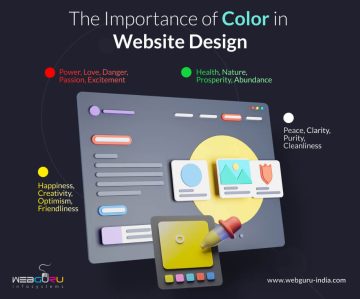
Color is visually appealing. There’s liveliness about color that is hard to deny. Color in website designs help effectively convey an idea or message; good content takes it a notch higher by explaining the specifics. Because man is a visual being, our first impressions and perceptions are always derived from how things look. Hence color is undeniably one of the most important elements of web design.

Specific colors are used to interpret specific web businesses. Majority website designers stick to color-stereotypes while designing their websites. For this article, we will take the example of a beach holiday website to analyze web user reaction to website color.

Are Web Users Affected by Website Color?

Most beach holiday websites make use of yellows, blues and greens reminiscing the sand, sea and vegetation.  One hardly finds these websites in color combinations using anything different from shades and hues of yellows, blues and greens. In case they do, they are likely to ward off 60% of web users, discouraging them from acting positively on the site.

Yes, it’s true. Website color affects web user decision. Colors convey:

  • Your website’s purpose and central idea.
  • Feel and quality of products, services, offers, etc.
  • Authority and authenticity of websites.

Web users expect stereotypes. A web designer’s job is to pick out colors that best convey a website’s message. The trick is to draw a balance between what users expect and a website design that stands out. Using different color shades help develop distinct websites. Of course, additional elements like images, text and overall layout help deliver uniqueness.

Is it Safe to Break Away from Stereotypes?

Yes…depends to what extent. A beach holiday website can’t hope to succeed with pink, purple and black for its color scheme. A web designer could bank on the ‘shock’ value and exclusive content, but compared to similar websites with stereotypical colors, has less chance of attracting users.

Colors don’t just convey a website’s central idea. It tells people what they should think and feel. It’s all about vivid imagination through colors. If your potential customer isn’t thinking about the sun, sea and sand on your beach holiday website, there’s grim chance he’ll act favorably.

Break from stereotypes to the extent that you are different from your competitors but well within the purview of your niche. For example: if most beach holiday websites have images sticking against a white or blue background, try a graphical image background, complete with palm trees and hammocks with sales copies on white tablets for better readability. Try oranges, browns, grays, citrus and indigo shades instead of typical yellows, greens and blues for your website.

The idea is to help website users identify your niche and relate to your website immediately upon arrival. Colors can significantly influence this.

In conclusion, website colors should be able to draw a balance between what users see in the real world and what users expect see in a virtual representation of the real world. If web users cannot relate, they will not act. Simple!